Getting started with interpreter
3.1 Python Interactive Interpreter
In the previous section, we saw how to install Python in various operating system. Now let’s learn how to use Python Interactive Interpreter and how to run a python program.
If you are using Windows open command prompt and type python. If you are using Mac, open Terminal and type python. open Console and type python in Linux.
This command opens Python interactive interpreter like the one shown below.

The >>> mark means it is interpreter and you can type and valid python statements there. For example, just 3 + 4 and press enter. 3 + 4 is a valid Python statement and it will be evaluated and output will be printed. When you type _ to this prompt, you will get the last evaluated result. In our case, it is 7. So now you can type _ + 3 and your will get 10.
There is a built-in function called help, which can be used to get help documentation for any objects. Type help(str.replace) and it will print out the help string for str.replace function.
There is also another helpful function dir which prints out all the attributes of the given object.
| |
You can also write multiline code in interpreter.
| |
When you see ... in the beginning, it means you are expected to type more code or you can just press Enter again and the entire code will be executed.
3.1 Running python programs
Python interpreter is mainly used for experimenting with code. It is where you try different ways quickly before doing actual coding. But eventually we have to save our programs in file and run it. In this section we will see how to run python programs.
Create a directory named pyprograms in your home directory. In this directory create a file called hello.py with content given below.
| |
Now you can run the program with
| |
You can make a python script executable by putting a shebang line at the top of the file like below
| |
Now make the file executable.
| |
Now we can run hello.py like any other unix executable script.
./hello.py
3.2 What happens when you run a Python program
Python is called interpreted language. This means that there is no compilation step like C or Java. You write the program and run the program directly. Interpreter executes the instructions one by one. Even though, there is no compilation step, there is a optimization step happens behind the scene when you run your Python program.
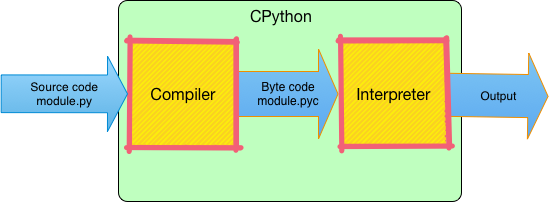
When you type python hello.py in terminal or command prompt, python first creates a file called hello.pyc. This is called byte code. Later this byte code is executed in the python interpreter from top to bottom one line at a time. Remembering this execution flow will help you to understand the code flow of large python programs.
Below image shows these steps.
3.3 What is CPython?
When you run a Python program using python hello.py, python command is actually a program which runs your python program. The program which runs your Python program is called CPython. It is called CPython because it has been written using C. CPython is the one we installed in previous chapter.
There are other alternatives to CPython. Right now don’t worry about those implementations as we are just starting to learn Python. Let’s save it for future.