Dictionary
6.1 Introduction
In this chapter, we will learn about Python dictionaries. It sometimes is being called as hash map in other programming languages. Every item
in a dictionary has a key and a corresponding value. key is just a label of the value. A key value pair in a dictionary is called as an item. Let’s define a dictionary representing the movie Toy Story.
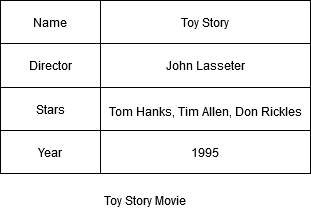
In the above dictionary, Name, Director, Stars and Year are called keys. Each key will have a corresponding value. For example Name of the move is Toy Story.
6.2 Dictionary operations
6.2.1 Defining a dictionary
Dictionary are created using curly braces ({}). Suppose we are building a website for employee management. To represent an employee (or a person), we can use a dictionary.
| |
To create an empty dictionary, we can also use curly braces.
| |
In the above example, we create a dictionary called person and we add a new key value pair (Name, 'John')
6.2.2 Adding key value pairs to a dictionary
To add a new key to the dictionary we use square bracket to access that item and assign a new value. Let’s add a new key to the person dictionary. For example let’s say we want to add the salary to john dictionary.
| |
6.2.3 Retrieve data from a dictionary
To retrieve an item from a dictionary, we can use square bracket. For example, to get the name of the person we can use
| |
dict.items() method returns the list of tuples (A list containing tuples. Each tuple is a
key value pair from the dictionary)
| |
Sometimes we may want to loop through a dictionary items one by one. This is one of the very common usage of dictionary.
| |
6.2.4 Editing values
Remember, we use the same syntax for adding a new key and also for editing an existing item. So to change the salary of John to 12000, we can use
| |
6.2.5 Deleting values
To delete a dictionary key value pair just use in-built function del
| |
6.3 Sorting a dictionary
Let’s create a dictionary that represents share names and prices.
| |
sorted(shares) sorts the dictionary keys and the output is a list. So how do we get sorted key value pairs? yes using sorted(shares.items())
| |
Can I get the list of values sorted? Yes, using sorted(shares.values())
| |
6.3 Conclusion
In this chapter we have studied about dictionaries, how to create them and other dictionary operations like update and delete.
Keep the following things in mind before moving on to next chapters.
- Each key value pair in a dictionary is called a item.
- A dictionary consists of zero or more items.
- Each item in a dictionary is separated by comma
, - Key and value are separated by colon
: - Key must be an immutable object like number, string and etc. A tuple also can be a key because it is immutable.
- Dictionary items are ordered.
6.7 Exercise Programs
Let’s say we have the salary of three employees in a dictionary. Find the average salary.
| |